This article is brought to you by Lizzsews.
In today's article, I will guide you through how 3D printed Not just any 3D print… the impROCKster print. The Rock x Among Us. Follow along with this project and share your result in Lizzsews Facebook group.
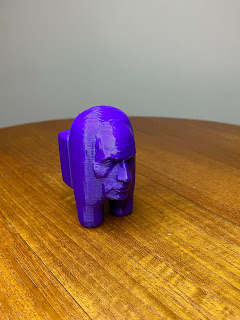
What I used:
PLA filament
3D printer
Cura (slicing software)
Recommended read: What is PLA
Recommended read: About my 3D printer
Recommended read: What is slicing in the 3D printing world
The steps I took:
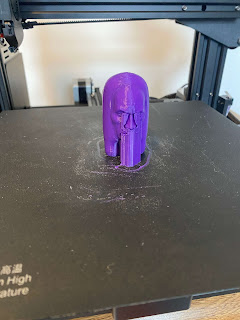
I started by just exploring some 3D print files. I found this awesome print from Thingiverse, created by TheRealRussell. I sliced the file in Cura and adjusted the settings. I used MECH solutions PLA filament and these were the settings that I used:
200 nozzle temp
60 bed temp
0.2mm height
50mm/sec speed
15% infill - zig zag fill
Supports yes
Retracting set as per Cura's PLA default
Recommended read: Mythosaurs 3D print: How I made article 13
Recommended read: Snow Tri-Tray: How I made article 15
Leave a comment below and let me know if you made the ImpROCKster! And don't forget to subscribe to stay up to date with all of Lizzsews new articles. See you next time!
You have Shared great content here about Art Printing Toronto I am glad to discover this post as I found lots of valuable data in your article. Thanks for sharing an article like this.
ReplyDeleteExtremely useful information which you have shared here about Slm 3d Printing Nelson This is a great way to enhance knowledge for us, and also beneficial for us. Thank you for sharing a blog like this.
ReplyDeleteGreat post, your all points fully clarify, Printing Company bangalore These steps are very helpful for us. Thank you for providing such a valuable information.
ReplyDeleteYou've posted a phenomenal and helpful snippet of data here. I'm thankful that you basically imparted this accommodating data to us. Kindly keep on being educated thusly. Much thanks for sharing it. 3d Printing Concrete
ReplyDeleteYou've posted a phenomenal and helpful snippet of data here. I'm thankful that you basically imparted this accommodating data to us. Kindly keep on being educated thusly. Much thanks for sharing it. 3d Printing Concrete
ReplyDeleteCool 3D
ReplyDeleteThe objective is always to do it once well, instead of working in a perpetual cycle of rescanning the object over and over again due to poor planning. physicaldigital.com
ReplyDelete