This article is brought to you by Lizzsews.
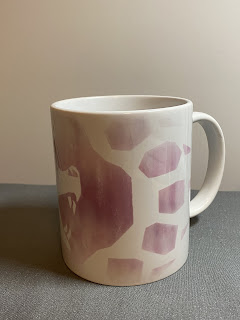
In today's article, I will guide you through how I made a 'watercolour' purple bear mug with infusible ink without a mug press. Follow along with this project and share your result in Lizzsews Facebook group.
Recommended read: How I made article series

What I used:
- Mug with sublimation coating
- Infusible ink purple transfer sheets
- Cricut
- EasyPress 2, mini + mat
- Lint-free cloth
How I made it:
I started off by looking for a design that I wanted to go on the mug. I ended up finding a really cool bear paw mug design in cricut design space. Image ID: #M2636F1F9.
I kept the design as is but sized it down a very small amount. I mirrored the design and placed my purple infusible ink onto the mat and cut. I weeded the design by peeling up the not needed pieces and wiped the mug with a lint-free cloth.
I wrapped the design around the mug, liner side up. Now was the trickiest and most difficult part as I don't have a mug press yet. I heated my easy press all the way and preheated my easypress 2 to 400°. I slowly went around the mug and pressed with my mini, once I was done I tried to peel of the transfer sheet and barely any of the ink was on the mug! It looked like a mess. I didn't peel much and I put it right back down onto the mug.
I went even slower and pressed all around the mug, I even used my easypress 2 for some more pressure and heat. After what felt like ages, I peeled the lining up and the mug looked great! The majority of the ink had gone onto the mug and I was left with a super cool water colour effect.
What other designs do you think would look awesome on a mug with the water colour effect?
Recommended read: How I made: Valentine's Day Card With Cricut
Leave a comment below and let me know if you made this mug, and share your no mug press tips! Don't forget to subscribe to get notified for my next blog post :)
Comments
Post a Comment